FEATURE
Integrations
Connect an AI assistant, the Gmail add-on, mailboxes, LinkedIn, email marketing and a project manager.
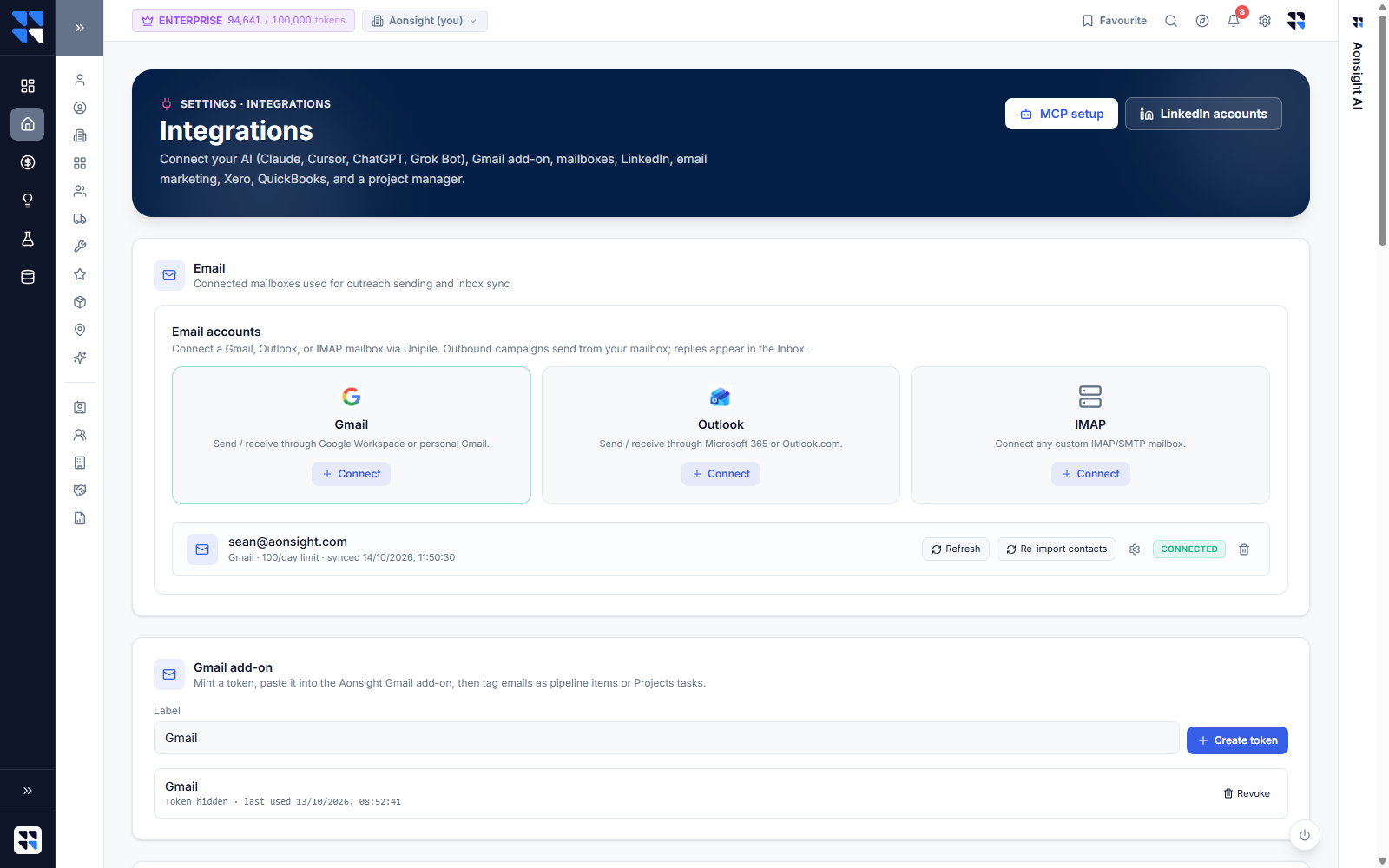
- Connect Gmail, Outlook or IMAP
- Mailchimp, MailerLite and HubSpot
- Send open tasks to Asana
- Tokens for the Gmail add-on
Each part opens its own trail
Email accounts
Connect a Gmail, Outlook or IMAP mailbox for outreach sending and inbox sync.
Gmail add-on
Create a token for the Aonsight Gmail add-on, then tag emails as pipeline items or tasks.
Email marketing
Connect Mailchimp, MailerLite or HubSpot to push contacts or import an audience.
Project managers
Link Asana so open pipeline tasks and new follow-ups appear in a project there.
From a question to a finished result in three steps
Step 1
Choose a connection
Open Integrations and pick the mailbox, marketing service or project manager you use.
Step 2
Check the status
Aonsight lists each connected account with its status and when it last synced.
Step 3
Start your outreach
Send email campaigns from the connected mailbox, and manage LinkedIn accounts under LinkedIn Outreach.
IN THE APP
Integrations
- Email campaigns need a connected mailbox.
- LinkedIn campaigns need a connected LinkedIn account.
- MCP tokens for an assistant are created under Your Company → MCP.
One question, from first search to final list
A connected mailbox lets Email Outreach send, LinkedIn accounts sit under LinkedIn Outreach, and assistants connect through MCP.
Use Integrations in your own market
Open it before your first campaign, and leave with the mailbox, marketing service and project manager your team uses connected.
Integrations is where the workspace connects the tools outreach and AI need: Claude, Cursor, ChatGPT or Grok Bot, the Gmail add-on, mailboxes, LinkedIn, email marketing and a project manager. A connection here is what lets Outreach send.
What you can do with Integrations
- Email campaigns need a connected mailbox.
- LinkedIn campaigns need a connected LinkedIn account.
- MCP tokens for an assistant are created under Your Company → MCP.
Where to find it
In app.aonsight, open Settings → Settings.
Where to go next
- MCP: Connect an assistant.
- Email Outreach: A connected inbox.
Questions
What is Integrations in Aonsight?
Integrations is where the workspace connects the tools outreach and AI need: Claude, Cursor, ChatGPT or Grok Bot, the Gmail add-on, mailboxes, LinkedIn, email marketing and a project manager.
Where do I open Integrations?
In app.aonsight, open Settings → Settings.
Related
Pages and posts that share a category or tag.