FEATURE
Competitors
Keep the competitor list that feeds benchmarks, gap analysis and dashboard counts.
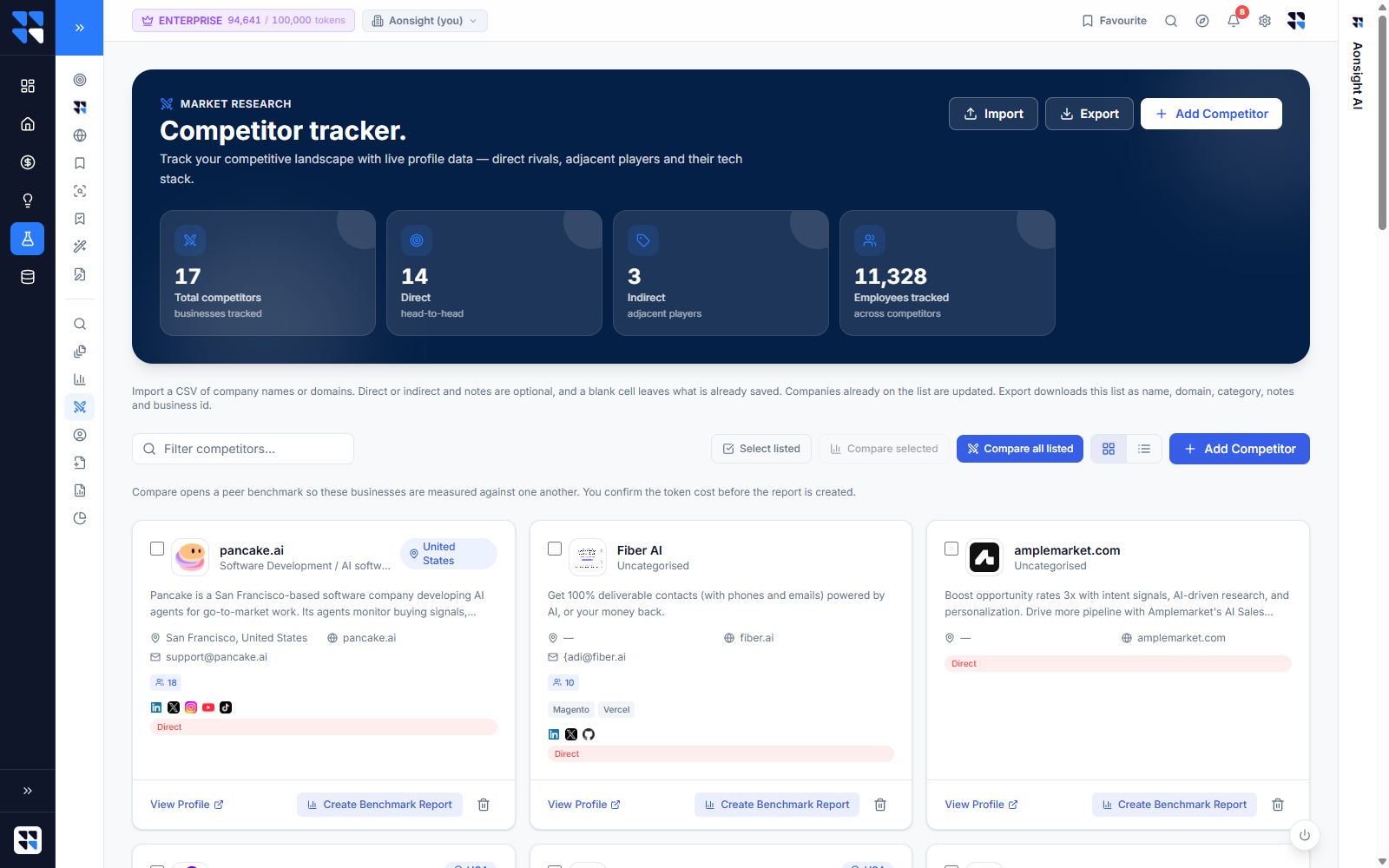
- Add rivals from the archive
- Tag each as direct or indirect
- CSV import and export
- Compare selected in a benchmark
Each part opens its own trail
Add competitor search
Search the archive by name, description or domain and add a business as direct or indirect.
Competitor cards
Each card shows location, employees, services and tech stack, with a link to the full profile.
Import and export
Import a CSV of company names or domains, or export the list with category and notes.
Compare actions
Select listed competitors to open a peer benchmark, or create a benchmark report from one card.
From a question to a finished result in three steps
Step 1
Add your rivals
Search the archive or import a CSV, and mark each company as a direct or indirect competitor.
Step 2
See the tracked list
Aonsight shows each rival with live profile data and counts your direct and indirect competitors.
Step 3
Compare or remove
Send selected competitors into a benchmark, and remove anyone you no longer want in reports.
IN THE APP
Competitors
- Add companies from the archive rather than typing a free-text name.
- Profiles stay live, including technology where the archive has it.
- Remove anyone you no longer want in benchmarks and gap reports.
One question, from first search to final list
The list is built from archive businesses and feeds Competitor Benchmark, Competitive Gaps and your dashboard counts.
Use Competitors in your own market
Whoever owns competitor tracking opens it to keep the rival list current and leaves with a list ready for benchmarks and gap analysis.
Competitors is the list of archive businesses you track as rivals. Add direct and adjacent players. This list feeds benchmarks, competitive gaps and the counts on your dashboard.
What you can do with Competitors
- Add companies from the archive rather than typing a free-text name.
- Profiles stay live, including technology where the archive has it.
- Remove anyone you no longer want in benchmarks and gap reports.
Where to find it
In app.aonsight, open Research → Market Research.
This sits with Market Research.
Where to go next
- Competitor Benchmark: Compare one rival.
- Competitive Gaps: See the gaps against the list.
Questions
What is Competitors in Aonsight?
Competitors is the list of archive businesses you track as rivals.
Where do I open Competitors?
In app.aonsight, open Research → Market Research.
Related
Pages and posts that share a category or tag.