FEATURE
Aonsight AI
Aonsight AI is the chat inside the app. Ask in a sentence, answer a short follow-up, and a successful answer costs 2 tokens.
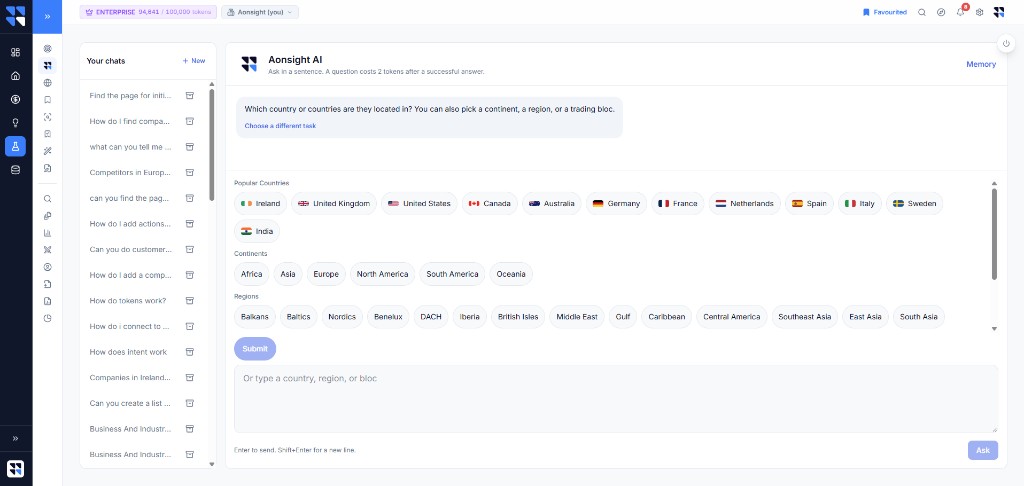
- Ask in a plain sentence
- Chats saved under Your chats
- Pick a country or region chip
- Memory kept for each task
Each part opens its own trail
Your chats
Keeps past conversations in a list beside the chat, with a New button to start another.
Question box
Type a question in a sentence, then press Enter or select Ask to send it.
Follow-up choices
When a question needs a place, pick a country, continent, region or trading bloc on screen.
Task memory
Holds the details of the task you are on, and opens from the top of the chat.
From a question to a finished result in three steps
Step 1
Ask your question
Type a question in a sentence, such as companies in Ireland or competitors in Europe.
Step 2
Answer the follow-up
Aonsight AI asks for one detail when it needs it, with choices to click or a box to type in.
Step 3
Reopen the chat later
Read the answer, then find the conversation again under Your chats.
IN THE APP
Aonsight AI
- Take a question in plain language from the box at the bottom of the chat.
- Save the conversation under Your chats, so you can open it again.
- Keep Memory for the task you are in.
- Ask where the businesses are, when a question needs a place. Pick a country, a continent, a region or a trading bloc, or type one, then submit. You can also choose a different task.
One question, from first search to final list
Questions reach the same archive as Search Archive, and successful answers are charged to the workspace token balance.
Use Aonsight AI in your own market
Open it when you have a question about a market or about Aonsight itself, and leave with an answer saved in your chat list.
The screenshot above is a real reply from the product. A question about a set of businesses needed a place, so Aonsight AI asked which country, continent, region or trading bloc to use, and put the choices on screen.
What it is
Aonsight AI is the assistant inside app.aonsight. You type a question in a sentence. It keeps your chats, and Memory stays with the task you are on. When it needs one detail before it can continue, it asks, and it gives you something to click.
It is separate from MCP. MCP connects Claude, ChatGPT, Cursor, Copilot, Windsurf, Gemini or Grok Bot. Aonsight AI is the chat in the app itself.
What it can do
- Take a question in plain language from the box at the bottom of the chat.
- Save the conversation under Your chats, so you can open it again.
- Keep Memory for the task you are in.
- Ask where the businesses are, when a question needs a place. Pick a country, a continent, a region or a trading bloc, or type one, then submit. You can also choose a different task.
- Charge 2 tokens after a successful answer. The charge comes off the same balance as the rest of the workspace. The price is stated at the top of the chat.
Sample questions
Ask in a sentence. These are questions already sitting in a real chat list on that screen:
- How do tokens work?
- How does intent work?
- Companies in Ireland.
- Competitors in Europe.
The reply in the screenshot is what comes back when the question still needs a place. Popular countries on that screen include Ireland, the United Kingdom, the United States, Canada, Australia, Germany, France, the Netherlands, Spain, Italy, Sweden and India. Continents are Africa, Asia, Europe, North America, South America and Oceania. Regions include the Nordics, Benelux, DACH, the Middle East and others. You can ignore the chips and type a country, a region or a bloc yourself.
Where to go next
- MCP: Use the archive from an outside assistant.
- Search Archive: The data a question can reach.
Questions
What is Aonsight AI in Aonsight?
The screenshot above is a real reply from the product.