FEATURE
Features
Every feature in app.aonsight, from search and market research through pipeline, outreach and sales.
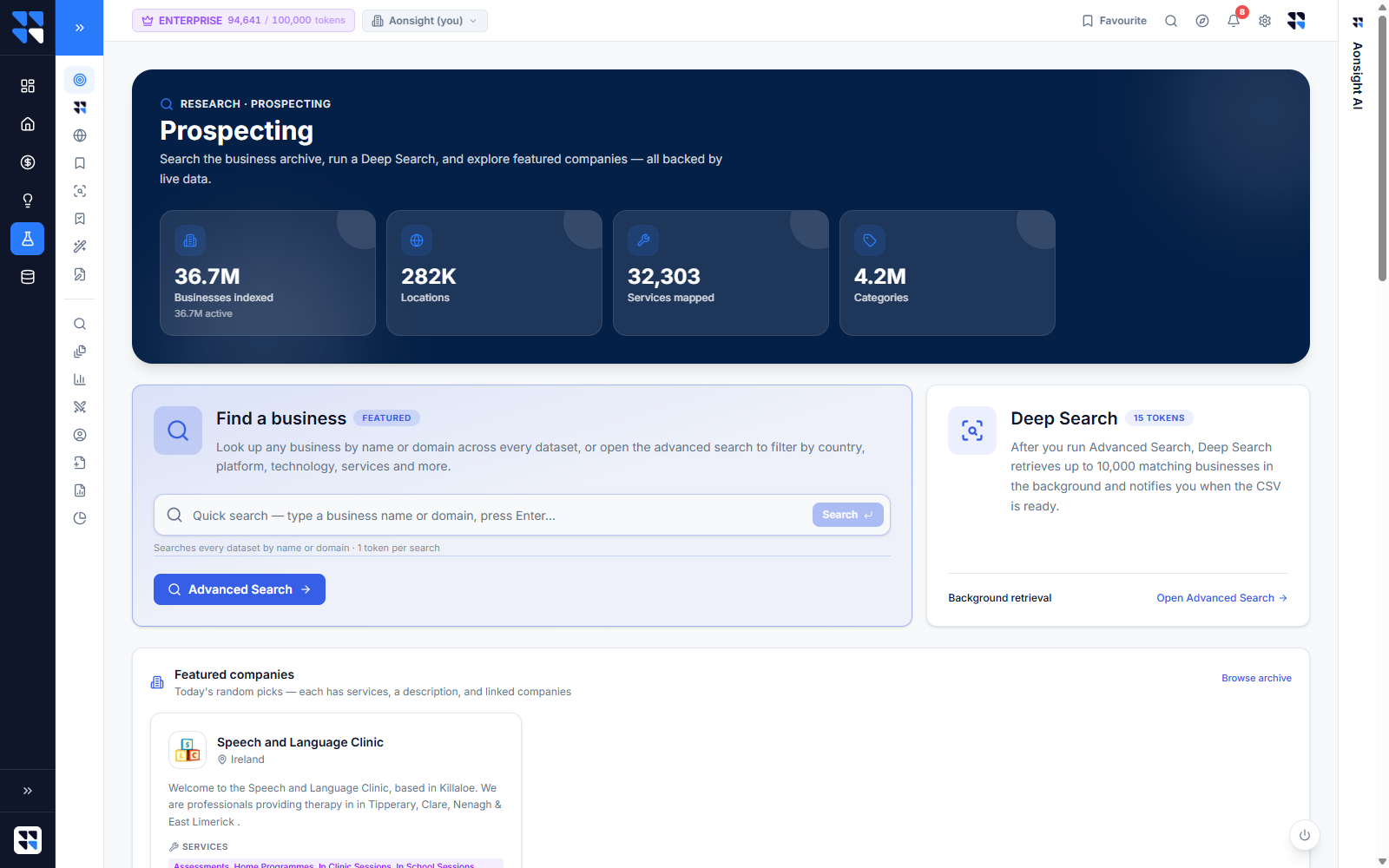
- Archive search and saved filters
- Market sizing and benchmarks
- Pipeline boards and deal tracking
- Email, LinkedIn and phone outreach
Each part opens its own trail
Research and prospecting
Search the business archive, then size the market, benchmark competitors and build reports.
Opportunities and financing
Review in-market prospects, intent signals, competitive gaps and renewals, plus investors and grants.
Pipeline, outreach and sales
Move businesses across boards, run outreach by email, LinkedIn and phone, and forecast your deals.
Company profile and contacts
Record your services, brands and locations, and keep people, companies and clients in one address book.
From a question to a finished result in three steps
Step 1
Start in Research
Search the archive by name, domain, country or technology and size the market you want to reach.
Step 2
Review the opportunities
Aonsight shows in-market prospects, intent signals matched to your services, and gaps against tracked competitors.
Step 3
Work the pipeline
Add the businesses that fit to a board, run outreach, and follow each deal through to the forecast.
IN THE APP
Features
- Research, opportunities, pipeline, outreach and sales each open from their own section of the app.
- Every area reads the same business archive and your company profile.
- Each feature has its own page here, with a screenshot from the product.
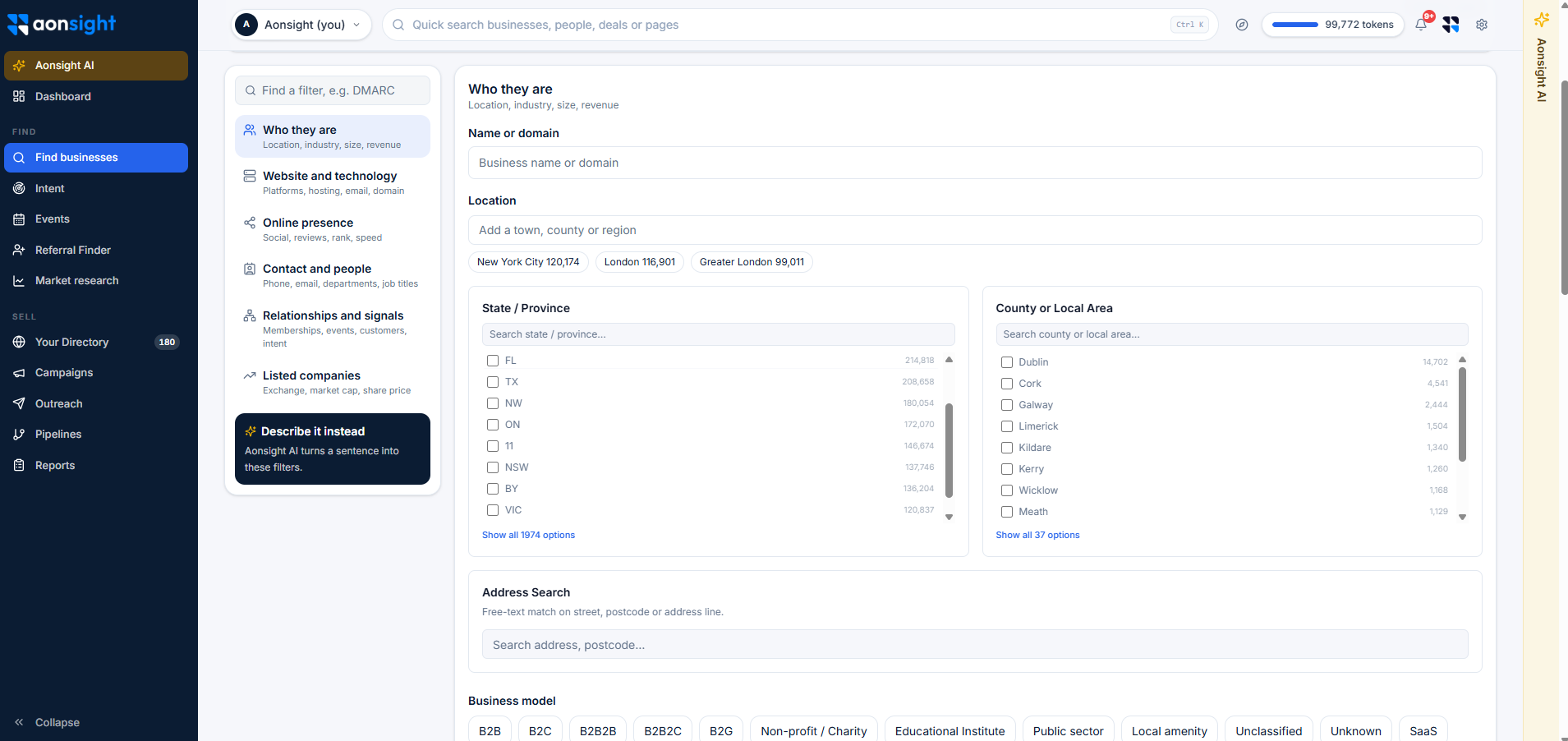
One question, from first search to final list
Every area reads the same business archive and your company profile, so research carries into pipeline, outreach and sales.
Use Features in your own market
Open Features when you are assessing Aonsight for your team and leave with a clear map of each working area and what it does.
Every working area in app.aonsight has its own page here. The descriptions match what the product does today: search, research, opportunities, pipeline, outreach, sales, and the company profile those tools read from.
Each feature page includes a screenshot from the product.
Research
- Research: Search the archive, then size the market, benchmark competitors and build reports from the same dataset.
Research · Prospecting
- Prospecting: Search the business archive, run a Deep Search, and open featured companies from one hub.
- Search Archive: Search the archive by name, domain, country, technology, platform and services, then open a full business profile.
- Saved Searches: Store archive filter sets and re-run them with one click.
- Services: Browse the service taxonomy and see which businesses offer each service.
- Brands: Browse platforms and technologies in the archive and see which businesses run them.
- Product Types: Browse product types and find the businesses linked to each one.
- Locations: Explore countries, regions and cities, then drill into the businesses in each place.
- Enrichment Requests: Track data-enrichment requests you have submitted from business profiles.
- Suggested Edits: Follow profile changes you have proposed. The Aonsight team reviews each one before it is applied.
Research · Market Research
- Market Research: Open combined reports, competitor benchmarks, personas, the report builder and market sizing from one hub.
- Combined Reports: Bundle saved research into one branded view and PDF. Creating a pack spends tokens. Re-opening and export do not.
- Competitor Benchmark: Compare a business one-to-one, against a selection, against every tracked competitor, or peer to peer.
- Competitors: Keep the competitor list that feeds benchmarks, gap analysis and dashboard counts.
- Personas: Build buyer personas from your market and reuse them in reports and outreach.
- Report Builder: Pick criteria, watch the live match count, and generate a shareable report.
- Custom Reports: Open every report you have already generated. Each one has its own shareable URL.
- Market Sizing: Estimate TAM, SAM and SOM from live business data and save each sizing as a report.
Opportunities · Opportunities
- Opportunities: Turn archive signals into work: in-market prospects, expansion, gaps, renewals and trends.
- In-market Prospects: Review open deals ranked by value and probability, plus saved businesses that are ready to qualify.
- Intent Signals: See businesses whose archive signals match the services on your profile.
- Market Expansion: See market-size reports, buyer personas, and countries you do not yet serve.
- Competitive Gaps: See where you under-index against tracked competitors, using your benchmark reports.
- Renewals: See upcoming customer review dates and active customers with no deal in motion.
- Trending Topics: Generate reports that bundle curated trend research for your services and locations.
Opportunities · Financing
- Financing: Open a directory of investors and a tracker of grants and public funding.
- Investors: Browse investors, filter by focus or stage, and open a record before you plan outreach.
- Grants: Review grant programmes, including eligibility and dates.
Sales · Pipeline
- Pipeline: Move businesses from first contact to closed on Prospects, Leads, or a board you create.
- Leads: Work qualified leads on a board, from early commitment through to closed.
- Pipeline Prospects: Work early-stage opportunities and move them toward Leads as they qualify.
- Custom Pipelines: Create a board with your own stages when Prospects and Leads are not the motion you need.
Sales · Outreach
- Outreach: Run email, LinkedIn, phone, events and referrals from one hub.
- Email Outreach: Create campaigns from a connected inbox and track sends, opens and replies.
- LinkedIn Outreach: Connect LinkedIn, then work prospects, connections and messages from Aonsight.
- Phone Outreach: Log calls against people and deals. Use a dialer when a phone provider is connected.
- Events: Join or create events, mark attendance, and capture the contacts you meet.
- Referral Finder: Find people in your network who can introduce you to a company already on a pipeline.
- Referral Prospecting: Start from people you know and see which companies they could open.
Sales · Sales
- Sales: Open the sales dashboard, accounts, deals, activities, forecasting and reports.
- Sales Dashboard: See revenue, deals closed, win rate and cycle time from your live pipelines.
- Accounts: Work target accounts with engagement, open pipeline and deal counts.
- Deals: Filter every deal by stage, owner and status, and watch velocity and win rate.
- Activities: Log calls, meetings, emails and follow-ups, and see what is due.
- Forecasting: Read weighted, best case and commit from deals that have an expected close date.
- Sales Reports: Review win rate, deal size and cycle time across the team.
Your Company · Profile
- Company Profile: The company data that personalises search, reports, intent and outreach.
- Your Profile: Update your name, photo and personal account. Company data lives elsewhere.
- Your Company: Set the workspace company, team and invites.
- Categories: Choose the industry categories that tell search and reports where you sit.
- Customers: List the archive businesses you already work with so reports and prospecting can use them.
- Your Services: Add the services you sell. Intent, reports and matching use this list.
- Your Brands: Add the brands you sell or represent so reports and archive matching can use them.
- Your Product Types: Record what you sell, by product type, next to services and brands.
- Your Locations: Add the places you operate. Market sizing, search defaults and reports use them.
- MCP: Connect Claude, ChatGPT, Cursor, Copilot, Windsurf, Gemini or Grok Bot to your Aonsight workspace.
Your Company · Contacts
- Contacts: Open people, the companies they work for, clients, and a summary of the address book.
- People: Search and filter people, then use them in referrals and outreach.
- Contact Companies: See every company in the address book (clients, prospects and pipeline targets) and the people who work there.
- Clients: See who you work with today and who you have worked with before.
- Contacts Summary: Chart growth, source, account coverage and client mix across the address book.
Settings · Settings
- Integrations: Connect an AI assistant, the Gmail add-on, mailboxes, LinkedIn, email marketing and a project manager.
- Usage and Limits: See token balance, plan limits and recent usage.
Where to go next
- Research: The research hub.
- Opportunities: In-market accounts and signals.
- Pipeline: Boards from first contact to closed.
- Find your platform: Filter Aonsight against the other platforms.
Questions
What is Features in Aonsight?
Every working area in app.aonsight has its own page here.